


Wireless Networking in Kenya
Wireless Networking in Kenya: 5 Reliable Wi-Fi Solutions
Wireless Networking in Kenya helps businesses, schools, hotels, institutions and other organizations provide dependable Wi-Fi access across offices, classrooms, reception areas, meeting rooms and outdoor spaces. A well-designed wireless network combines access points, switches, cabling, Internet connectivity and security controls to provide consistent coverage and capacity.
What Is Wireless Networking in Kenya?
Wireless Networking in Kenya uses radio-based wireless connections to allow laptops, smartphones, tablets, printers, IP phones and other compatible devices to communicate with a wired network. Business wireless networks normally use dedicated access points connected to Ethernet switches rather than relying only on a consumer router.
The design should consider the number of users, building construction, expected traffic, coverage areas, Internet bandwidth, security requirements and whether users need to move between multiple access points.
5 Benefits of Wireless Networking
1. Flexible Connectivity
Wireless connectivity allows users to work without a physical Ethernet connection at every desk. This is useful in offices, classrooms, meeting rooms and guest areas.
2. Easier Expansion
Additional access points can be added as coverage requirements grow, provided the wired network and wireless design can support the extra devices.
3. Better Mobility
Employees and visitors can move around a properly designed wireless environment while maintaining network access. Features such as roaming support can improve the experience across multiple access points.
4. Support for Modern Wi-Fi Standards
Modern business access points can use Wi-Fi 6 and other current standards to improve efficiency, capacity and performance when compatible client devices are used.
5. Centralized Management
Business-class wireless platforms can provide centralized configuration, monitoring, guest access controls and performance visibility across multiple access points.
Access Points for Business Wi-Fi
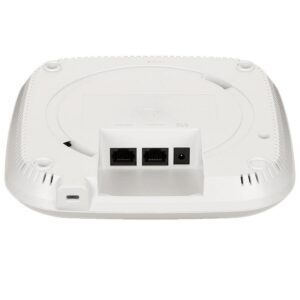
Access points are the core devices used to provide Wi-Fi coverage in professional environments. They connect to the wired network through Ethernet and broadcast wireless networks for users and devices.
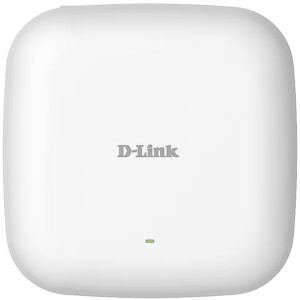
A current D-Link example is the DAP-X2810, an AX1800 Wi-Fi 6 dual-band PoE access point. D-Link lists 2.4 GHz speeds up to 574 Mbps and 5 GHz speeds up to 1201 Mbps, a Gigabit Ethernet PoE LAN interface, 2×2 MU-MIMO, band steering, airtime fairness and WPA/WPA2/WPA3 security options. Actual performance depends on the environment, client devices and network configuration.
Wi-Fi 6 and Wireless Network Capacity
Wi-Fi 6, based on IEEE 802.11ax, is designed to improve wireless efficiency and capacity, particularly in environments with many connected devices. Technologies such as OFDMA, MU-MIMO, beamforming and airtime management can help an access point serve users more efficiently.
However, choosing a Wi-Fi 6 access point does not automatically guarantee maximum speed. Building materials, interference, channel configuration, client capability, access-point placement and wired uplink capacity all affect real-world performance.
PoE for Wireless Access Points
Power over Ethernet can simplify access-point installation by allowing compatible devices to receive power and network connectivity over the same Ethernet cable. This can be especially useful for ceiling-mounted or wall-mounted access points where a nearby electrical socket may not be available.
When using PoE, confirm that the access point, switch or PoE injector use compatible standards and provide sufficient power for the selected device.
Wireless Network Security
Security should be part of the wireless design from the beginning. Business deployments may use WPA2 or WPA3 security, strong authentication, separate guest networks, VLAN segmentation, access controls and regular firmware updates where supported.
Guest Wi-Fi should normally be separated from sensitive internal systems. Businesses can also use authentication systems and network policies to control which users or devices can access specific resources.
How to Plan Wireless Networking in Kenya
- Survey the site: Identify walls, floors, equipment and areas requiring coverage.
- Estimate users and devices: Consider staff, guests, phones, laptops, cameras and IoT devices.
- Choose access points: Match indoor, outdoor, Wi-Fi standard and capacity requirements.
- Plan wired uplinks: Use suitable Gigabit or higher Ethernet connections and PoE where appropriate.
- Design channels and coverage: Avoid excessive overlap and account for interference.
- Separate networks: Use VLANs or equivalent controls for staff, guests and specialized devices where required.
- Test after installation: Check signal strength, throughput, roaming and application performance.
Wireless Networking Applications
- Corporate offices and commercial buildings
- Schools, colleges and universities
- Hotels and guest accommodation
- Retail shops and customer areas
- Healthcare and institutional environments
- Warehouses and selected industrial spaces
- Guest Wi-Fi and public access areas
- Temporary offices and flexible workspaces
Wireless Networking vs Wired Networking
| Feature | Wireless | Wired |
|---|---|---|
| Mobility | Excellent | Limited by cable connection |
| Installation | Flexible, but requires careful RF planning | Requires physical cabling |
| Consistency | Can vary with interference and environment | Usually more predictable |
| Best use | Mobile users and flexible coverage | Desktops, servers, switches and high-consistency links |
Why Choose M Heritage Technologies?
M Heritage Technologies provides networking equipment and IT infrastructure solutions for businesses and institutions in Kenya. We can help you select access points, PoE switches, routers, cabling and related equipment based on the size and requirements of your wireless environment.
Explore our Networking Solutions in Kenya, Network Switches in Kenya, PoE Switches in Kenya and Structured Cabling Solutions in Kenya pages for related solutions.
Frequently Asked Questions
What is wireless networking?
Wireless networking connects devices using Wi-Fi radio technology instead of requiring a physical Ethernet cable at every endpoint.
How many access points does a business need?
The number depends on building size, construction materials, user density, applications, interference and required coverage. A site survey is the best way to determine placement.
Is Wi-Fi 6 suitable for businesses?
Yes. Wi-Fi 6 is designed for improved efficiency and capacity in environments with many connected devices, making it suitable for many modern business networks.
Can access points use PoE?
Yes. Many business access points support Power over Ethernet. The PoE standard and available power should be checked before installation.
How can guest Wi-Fi be secured?
Guest traffic should normally be separated from internal business systems using appropriate authentication, VLANs, firewall policies and access controls.
Get Wireless Networking in Kenya
Need dependable Wi-Fi for your office, school, hotel or business premises? Contact M Heritage Technologies for assistance selecting wireless access points, PoE switches, routers and supporting network infrastructure.