


Business Wi-Fi Solutions in Kenya
Business Wi-Fi Solutions in Kenya: 5 Reliable Ways toImproveConnectivity
Business Wi-Fi Solutions in Kenya help offices, schools, hotels, retail businesses, warehouses and institutions provide reliable wireless connectivity for employees, customers and connected devices. A professional Wi-Fi network goes beyond installing a few access points. It requires proper coverage planning, capacity management, security, wired backhaul and ongoing monitoring.
M Heritage Technologies provides networking solutions designed around the environment, number of users, applications and expected network growth. Whether you need Wi-Fi for a small office or a larger multi-access-point environment, the right design can improve connectivity while making the network easier to manage and secure.
What Are Business Wi-Fi Solutions in Kenya?
Business Wi-Fi Solutions in Kenya are professionally designed wireless networking systems used to provide dependable Internet and local-network access across business premises. They can include Wi-Fi 6 access points, PoE switches, centralized management, guest networks, authentication, VLANs, wireless security and network monitoring.
Unlike a basic home router, a business wireless network is normally designed around coverage, concurrent users, traffic requirements, security and future expansion. Multiple access points can be coordinated to provide more consistent coverage throughout offices and larger premises.
5 Key Business Wi-Fi Solutions in Kenya
1. Wi-Fi 6 Access Points
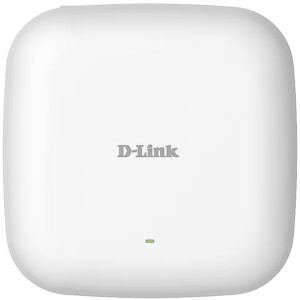
Wi-Fi 6 is designed to improve wireless efficiency and capacity in environments with many connected devices. A current example is the D-Link DAP-X2810, an AX1800 dual-band Wi-Fi 6 access point with 2×2 MIMO, band steering, airtime fairness, PoE and centralized Nuclias Connect management.
For offices with laptops, smartphones, IP phones, printers and other wireless devices, selecting the appropriate access point can help provide a more predictable wireless experience.
2. Professional Wi-Fi Planning and Coverage
Good Wi-Fi starts with proper planning. Building materials, walls, floors, equipment placement, interference and user density all affect wireless performance. Simply adding access points without understanding these factors can create overlapping coverage and inconsistent performance.
A professional deployment considers where users work, where high-bandwidth applications are used and how wireless devices move through the building. Access points can then be positioned to provide appropriate coverage while avoiding unnecessary equipment.
3. Secure Guest and Employee Wi-Fi
Businesses often need separate wireless access for employees and visitors. Guest Wi-Fi can provide Internet access without unnecessarily exposing internal business systems.
Modern business access points can support security technologies such as WPA2/WPA3, authentication and access-control features, depending on the model. The DAP-X2810, for example, supports WPA/WPA2/WPA3 security, MAC access control and captive portal functionality.
4. Centralized Wi-Fi Management
Managing several access points individually can become difficult as a business grows. Centralized management allows administrators to monitor and configure multiple wireless devices from a common platform.
D-Link’s DAP-X2810 works with Nuclias Connect, which provides centralized management and tools for monitoring, automation and scaling a business wireless network.
This approach can make it easier to maintain consistent wireless settings and identify problems across multiple access points.
5. PoE-Based Wireless Deployment
Power over Ethernet can simplify access-point installation by allowing compatible network switches to carry both data and electrical power over Ethernet cabling. This can reduce the need for separate power outlets near ceiling-mounted access points.
The DAP-X2810 includes a Gigabit Ethernet PoE LAN connection and supports IEEE 802.3at PoE, making it suitable for structured business deployments where compatible PoE switching is available.
Business Wi-Fi for Different Environments
Office Wi-Fi
Office networks need dependable access for computers, mobile devices, cloud applications, video meetings and business communication. Access-point placement and capacity planning become particularly important in meeting rooms and high-density work areas.
Hotel and Hospitality Wi-Fi
Hotels and hospitality businesses may require separate guest and staff networks, coverage across rooms and common areas, authentication and centralized management. Guest experience should be considered alongside network security.
School and Institutional Wi-Fi
Schools and institutions can have many simultaneous users and different access requirements for students, teachers, administrators and visitors. Segmentation and appropriate authentication can help organize wireless access.
Retail and Commercial Wi-Fi
Retail businesses may use Wi-Fi for staff systems, point-of-sale environments, inventory devices and controlled customer access. The wireless design should prioritize reliability and security for critical business operations.
How to Choose Business Wi-Fi Solutions in Kenya
- Estimate the number of users: Consider normal and peak concurrent connections rather than simply counting employees.
- Identify applications: Video conferencing, cloud applications, VoIP and large file transfers can have different bandwidth requirements.
- Assess building layout: Walls, floors and construction materials influence wireless coverage.
- Choose the right Wi-Fi generation: Wi-Fi 6 can be useful for modern environments with many connected devices.
- Plan wired backhaul: Use appropriate Ethernet cabling and switching between access points and the network core.
- Consider PoE: PoE can simplify deployment when compatible switches and access points are used.
- Plan security: Separate guest and internal access where appropriate and use strong authentication.
- Allow for growth: Choose an architecture that can accommodate additional users and access points.
Business Wi-Fi Security Best Practices
A reliable wireless network should also be a secure wireless network. Use strong administrator credentials, modern encryption where supported, controlled guest access and regular firmware updates. Avoid using one shared password for every type of user when the environment requires stronger access control.
For larger deployments, wireless networks can be integrated with VLANs, authentication and broader Network Security Solutions in Kenya. This creates clearer separation between guest, employee, voice, surveillance and management traffic where required.
Business Wi-Fi and Network Infrastructure
 Wireless access points depend on the wired network underneath them. A reliable deployment therefore requires suitable switches, structured cabling, Internet connectivity and appropriate network configuration.
Our Networking Solutions in Kenya can be combined with Managed Network Switches in Kenya, Network Installation Services in Kenya and Network Maintenance Services in Kenya to create a complete business network.
Why Choose M Heritage Technologies?
M Heritage Technologies helps businesses and organizations plan and deploy practical wireless and wired networking infrastructure in Kenya. We focus on selecting suitable equipment, designing reliable connectivity, configuring network security and providing ongoing technical support.
Whether you need Wi-Fi for a small office, a multi-floor business, a school, hotel or commercial premises, we can help assess your requirements and recommend a scalable solution.
Frequently Asked Questions
What are Business Wi-Fi Solutions in Kenya?
They are professionally planned wireless networking systems for businesses and organizations, including access points, wireless security, management, PoE and network infrastructure.
Is Wi-Fi 6 suitable for businesses?
Yes. Wi-Fi 6 is designed to improve wireless efficiency and capacity, making it useful for environments with many connected devices. Actual performance depends on the access point, client devices, network design and environment.
Why should guest Wi-Fi be separated from business Wi-Fi?
Separating guest access can reduce unnecessary exposure of internal business resources and allows different access policies to be applied.
Do business access points need PoE?
Not necessarily, but PoE can simplify installation by delivering power and data over the Ethernet connection when the access point and switch support compatible PoE standards.
How many Wi-Fi access points does my business need?
It depends on building size, layout, construction materials, user density, applications and the access point selected. A proper site assessment is more reliable than estimating only from floor area.
Get Business Wi-Fi Solutions in Kenya
Need reliable wireless connectivity for your business? Contact M Heritage Technologies for professional Business Wi-Fi Solutions in Kenya, including Wi-Fi 6 access points, wireless network planning, secure guest Wi-Fi, PoE deployment, centralized management and ongoing support.