


4G LTE Routers in Kenya
4G LTE Routers in Kenya: 5 ReliableInternet Solutions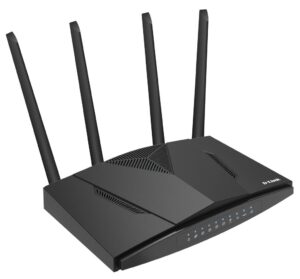
4G LTE routers in Kenya provide Internet connectivity through a mobile network SIM card, making them useful where fixed broadband is unavailable, unreliable or unsuitable. They can also provide backup Internet for offices, temporary connectivity for projects and flexible Internet access for remote locations.
M Heritage Technologies provides networking equipment and solutions for businesses and institutions in Kenya. When choosing a 4G LTE router, consider mobile coverage, supported LTE bands, SIM type, Wi-Fi capacity, Ethernet ports, security features and the number of users.
What Is a 4G LTE Router?
A 4G LTE router uses a mobile network connection to provide Internet access to connected wired and wireless devices. Instead of receiving Internet through a fixed fiber or Ethernet WAN connection, the router connects to a compatible mobile network using a SIM card.
Depending on the model, a 4G LTE router may provide Wi-Fi, Ethernet LAN ports, a WAN port, firewall protection, VPN features, SMS functions, external antennas and bandwidth management.
5 Important Benefits of 4G LTE Routers
1. Flexible Internet Connectivity
A 4G LTE router can provide Internet access in locations where fixed broadband installation is difficult or unavailable, provided there is suitable mobile network coverage.
2. Reliable Backup Internet
A 4G connection can serve as a secondary Internet path for a business. For automatic failover, the router or network architecture must support the required WAN failover functionality.
3. Quick Deployment
Mobile broadband can be deployed without waiting for a fixed-line installation. This can be useful for temporary offices, construction sites, events and remote projects.
4. Wired and Wireless Connectivity
Many 4G LTE routers provide Ethernet ports for wired devices and Wi-Fi for laptops, phones, tablets and other wireless equipment.
5. Portable Network Access
Some LTE routers are designed for flexible deployment and can be used in locations where a conventional fixed Internet connection is not practical.
Real Product Example: D-Link DWR-M921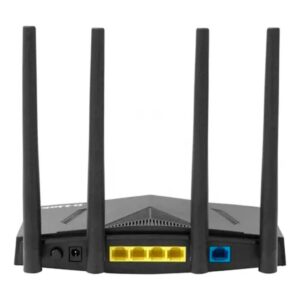
The D-Link DWR-M921 4G/LTE Wireless N300 Router supports 3G/4G mobile broadband and provides four 10/100 Ethernet LAN ports, one 10/100 Ethernet WAN port, a USB 2.0 port and Wireless N300 connectivity. D-Link lists LTE downlink speeds up to 150 Mbps and uplink speeds up to 50 Mbps for the model. These are theoretical/maximum figures and actual performance depends on the mobile network, signal conditions, configuration and other factors.
The DWR-M921 uses a SIM card and has two 5 dBi Wi-Fi antennas plus two 5 dBi LTE antennas. It also provides SPI and NAT firewall functions and WPA/WPA2 wireless security.
Important D-Link DWR-M921 Specifications
| Specification | D-Link DWR-M921 |
|---|---|
| Mobile network | 3G/4G LTE |
| Wi-Fi | 802.11b/g/n, N300 |
| LAN | 4 × 10/100 Ethernet |
| WAN | 1 × 10/100 Ethernet |
| SIM | Full-size SIM / 2FF according to D-Link documentation |
| USB | 1 × USB 2.0 |
| LTE downlink | Up to 150 Mbps |
| LTE uplink | Up to 50 Mbps |
| Wi-Fi antennas | 2 × 5 dBi |
| LTE antennas | 2 × 5 dBi |
| Security | SPI/NAT firewall and WPA/WPA2 |
4G LTE Routers in Kenya for Business Backup Internet
Businesses can use LTE connectivity as a backup Internet connection when their primary fixed connection fails. However, simply having an LTE router does not automatically provide failover. Automatic switching requires suitable WAN failover functionality in the router or network equipment.
Before using mobile Internet as a backup, check the coverage and reliability of the selected mobile network at the actual business location.
4G LTE Routers for Remote Locations
LTE routers can be useful for temporary offices, remote projects, construction sites, field operations and other locations where installing fiber or another fixed connection may take time or may not be practical.
External antenna support can also be important in locations with weak cellular signal. Always confirm antenna compatibility and supported LTE bands before purchasing.
4G LTE Router vs Fixed Broadband Router
| Feature | 4G LTE Router | Fixed Broadband Router |
|---|---|---|
| Internet source | Mobile network/SIM | Fiber, Ethernet or other fixed WAN |
| Installation | Usually quick | May require ISP installation |
| Mobility/flexibility | High | Location dependent |
| Performance | Depends on mobile signal/network | Depends on fixed connection |
| Backup use | Excellent where coverage is available | Usually primary connection |
How to Choose a 4G LTE Router in Kenya
- Mobile network coverage: Confirm that the selected operator provides strong and reliable coverage at the installation location.
- LTE bands: Check that the router’s supported bands are compatible with the intended mobile operator and regional hardware version.
- LTE category and speed: Compare the router’s LTE capabilities, while remembering that real-world speed depends on the network and signal.
- SIM compatibility: Check the required SIM size and whether the router is compatible with the intended mobile service.
- Wi-Fi: Choose a suitable Wi-Fi standard and capacity for the number of wireless users.
- Ethernet ports: Check the number and speed of LAN/WAN ports if you need wired devices.
- Security: Consider firewall, wireless encryption, VPN and management capabilities.
- External antennas: Consider antenna options for locations where cellular signal strength may be weak.
- Failover: If the router is for backup Internet, confirm that the required automatic failover feature is supported.
Applications of 4G LTE Routers
- Business Internet backup
- Remote offices
- Temporary offices and project sites
- Construction sites
- Rural and remote locations
- Small business Internet access
- Events and temporary deployments
- Field operations
Important Things to Check Before Buying
Do not choose a 4G LTE router based only on the advertised maximum download speed. Check LTE bands, network compatibility, signal strength, SIM requirements, Ethernet port speed, Wi-Fi capability, security, antenna options and firmware support.
Also distinguish between 4G LTE and 5G. A 4G router should not be advertised as a 5G device. For example, the D-Link DWR-M921 is a 3G/4G LTE router.
Why Choose M Heritage Technologies?
M Heritage Technologies provides networking equipment and technology solutions for businesses and institutions in Kenya. We can help you select a suitable LTE router based on mobile coverage, number of users, Wi-Fi requirements, wired connectivity and whether you need primary or backup Internet.
Explore our Networking Solutions in Kenya, Network Routers in Kenya, Business Wi-Fi Solutions in Kenya and Network Installation Services in Kenya.
Frequently Asked Questions
What is a 4G LTE router?
A 4G LTE router connects to a mobile network using a SIM card and shares the Internet connection with wired and/or wireless devices.
Can a 4G LTE router be used as business backup Internet?
Yes. A compatible LTE connection can be used as backup Internet. Automatic failover requires appropriate failover functionality in the router or network design.
Does a 4G router work anywhere in Kenya?
Not necessarily. Performance depends on mobile network coverage, supported LTE bands, signal strength, congestion and the operator’s service at the location.
Is the D-Link DWR-M921 a 5G router?
No. The DWR-M921 is a 3G/4G LTE N300 router.
Can a 4G LTE router connect wired computers?
Yes. Models with Ethernet LAN ports can connect computers, switches and other wired devices.
What is more important: LTE speed or signal strength?
Both matter. A router’s theoretical LTE capability does not guarantee the same real-world speed. Mobile signal quality, network congestion, supported bands and the operator’s network can significantly affect performance.