


CCTV Storage Solutions in Kenya
CCTV Storage Solutions in Kenya: Reliable Storage for Surveillance Recordings
CCTV Storage Solutions in Kenya are essential for keeping surveillance footage available when you need to review an incident, investigate a security event or provide evidence. A well-designed CCTV system needs more than cameras and an NVR; it also needs the right storage capacity, surveillance-grade hard drives, recording settings and retention plan.

What Is CCTV Storage?
CCTV storage is the system used to save video captured by security cameras. In an IP surveillance installation, cameras normally send video to an NVR or network recording platform, where footage is written to one or more hard drives. Storage requirements depend on the number of cameras, resolution, frame rate, compression, recording mode and how many days of footage you need to retain.
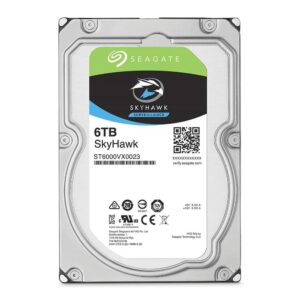
Surveillance hard drives are designed for workloads that differ from ordinary desktop computing. Seagate describes its SkyHawk range as optimized for surveillance workloads and continuous 24/7 operation, with models supporting multiple camera streams. Seagate SkyHawk surveillance hard drives
Why CCTV Storage Solutions in Kenya Matter
A camera can provide excellent images, but without adequate storage the footage may be overwritten before an incident is discovered. Proper storage planning helps you balance recording quality, retention time, system reliability and cost.
- Preserve important footage: Keep recordings available for investigations and incident review.
- Support continuous recording: Surveillance HDDs are designed for demanding recording workloads.
- Match retention requirements: Select capacity based on the number of cameras and desired retention period.
- Improve system reliability: Use storage designed and approved for surveillance equipment.
- Allow future expansion: Plan spare capacity when adding cameras later.
7 Key Factors When Choosing CCTV Storage
1. Number of Cameras
More cameras generate more video data. A system with four cameras requires substantially less storage than one with 32 or 64 cameras, especially when all cameras record continuously.
2. Camera Resolution
Higher-resolution cameras generally produce more data. A system using 8MP cameras will normally require more storage than a similar system using 2MP or 4MP cameras, although compression and recording settings also affect the final storage requirement.
3. Recording Retention Period
Decide how long recordings should remain available. A business may need a few weeks of footage, while a larger organization may require a longer retention period based on its operational or security requirements.
4. Continuous or Motion Recording
Continuous recording creates a more complete record but uses more storage. Motion-based recording can reduce storage consumption by recording only when relevant activity is detected. The appropriate approach depends on the site and security objectives.
5. Compression Technology
Modern CCTV systems can use video compression technologies such as H.265 or H.265+ to reduce storage and bandwidth requirements compared with less efficient compression methods. Actual savings vary with camera settings and scene activity.
6. Surveillance HDD Reliability
Use a hard drive intended for surveillance rather than selecting a desktop drive simply because it has the same capacity. Surveillance HDDs are designed for sustained video workloads and continuous operation.
7. NVR Compatibility
Check the NVR manufacturer’s compatibility list before installing a hard drive. Hikvision publishes HDD compatibility information for its DVR/NVR platforms, including surveillance and AI-class drives. Hikvision HDD compatibility list
Surveillance Hard Drives for NVR Systems
For most NVR-based CCTV installations, a surveillance-grade SATA hard drive is the standard storage option. The drive is installed inside the NVR and continuously receives video streams from connected cameras.
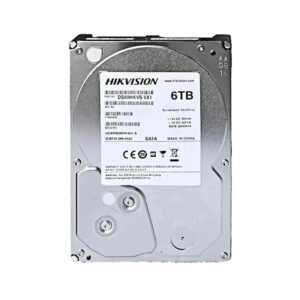
For example, Hikvision’s DS60HKVS-VX1 is a 6TB surveillance hard drive. Hikvision specifies a 3.5-inch form factor, SATA 6.0Gb/s interface, 256MB buffer, 24×7 operation and support for up to 64 high-definition camera streams for this model.
Seagate SkyHawk for CCTV Storage
Seagate SkyHawk is another well-known surveillance storage family. Depending on the exact model, SkyHawk drives are available in different capacities and are designed for surveillance workloads. Seagate’s specifications for the 6TB ST6000VX0023 include SATA 6Gb/s, 256MB cache and support for up to 64 cameras. Seagate 6TB SkyHawk datasheet
The exact model number should always be checked from the drive label and current manufacturer documentation before publishing a product specification on an e-commerce listing.
How Much CCTV Storage Do You Need?
There is no single storage capacity that fits every CCTV installation. A useful planning process is to consider:
- Number of cameras
- Resolution of each camera
- Frame rate
- Compression format
- Continuous or event-based recording
- Hours of recording per day
- Required retention period
- Whether audio is also being recorded
As a simple example, increasing the number of cameras or extending retention from 14 days to 30 days can significantly increase the required capacity. Storage should therefore be calculated from the actual camera configuration rather than choosing a drive based only on its advertised terabytes.
Continuous Recording vs Motion Recording
| Recording Method | Advantages | Considerations |
|---|---|---|
| Continuous recording | Provides a complete video history | Uses more storage |
| Motion/event recording | Can reduce storage consumption | Configuration must be appropriate to avoid missing relevant activity |
| Hybrid recording | Can prioritize important cameras or events | Requires careful system configuration |
CCTV Backup and Redundancy
Recording to an NVR is not automatically the same as having a backup. If footage is important, consider an appropriate backup strategy, such as exporting critical incidents, using additional storage, or integrating suitable network or cloud-based recording where supported.
For high-value surveillance environments, storage redundancy and system health monitoring should also be considered. The exact RAID and redundancy options depend on the NVR or storage platform.
CCTV Storage for Businesses, Homes and Institutions
- Homes: Small camera systems can use compact surveillance storage matched to the required retention period.
- Retail shops: Storage should cover entrances, tills, customer areas and other important zones for the required number of days.
- Offices: Storage planning should account for multiple indoor and outdoor cameras and any access-control integration.
- Schools and institutions: Larger sites may need multiple NVRs or larger storage capacity to maintain appropriate retention.
- Industrial facilities: High camera counts, higher resolutions and longer retention can require larger surveillance storage systems.
How to Choose CCTV Storage in Kenya
- List the cameras: Record the number and resolution of every camera.
- Define retention: Decide how many days of recordings you need.
- Choose recording modes: Determine which cameras require continuous recording and which can use event-based recording.
- Check the NVR: Confirm the number of HDD bays, maximum supported capacity and compatible drives.
- Allow for growth: Leave room for additional cameras or longer retention in the future.
- Use surveillance-grade drives: Select storage designed for CCTV workloads.
CCTV Storage Installation and Maintenance
Correct installation helps protect both the recorder and the storage drive. The HDD should be installed according to the NVR manufacturer’s instructions, securely mounted and configured through the recorder’s storage settings. Regularly check drive health, recording status, available capacity and system alerts.
If a drive develops errors or the NVR reports abnormal storage status, investigate promptly. Important footage should also be exported before replacing a failing drive when possible.
Why Choose M Heritage Technologies?
M Heritage Technologies helps businesses, institutions and other organizations in Kenya plan CCTV recording and storage solutions. We can assist with NVR selection, surveillance HDD sizing, camera-to-storage planning, installation, configuration and CCTV maintenance.
Frequently Asked Questions About CCTV Storage Solutions in Kenya
What type of hard drive is best for CCTV?
A surveillance-grade hard drive is generally the appropriate choice for NVR and DVR recording because it is designed for continuous surveillance workloads.
Is a 6TB hard drive enough for CCTV?
It depends on the number of cameras, resolution, recording mode, frame rate, compression and required retention period. A 6TB drive may be suitable for one installation but insufficient for another.
Can I use a normal desktop hard drive in an NVR?
Compatibility and suitability depend on the recorder, but surveillance installations are generally better served by drives designed for continuous video workloads. Always check the recorder manufacturer’s compatibility requirements.
How long can CCTV footage be stored?
The retention period depends on storage capacity and recording settings. Increasing camera count, resolution or continuous recording reduces the number of days available on a fixed-capacity drive.
Can I add more storage to an NVR?
Some NVRs allow additional hard drives, while others have a fixed number of storage bays or capacity limits. Check the exact NVR specifications before purchasing additional storage.
Need CCTV Storage Solutions in Kenya? Contact M Heritage Technologies for help selecting surveillance hard drives, NVR storage capacity and a reliable CCTV recording solution for your site.